
platformIOというのがあるらしい。Arduino-IDEでどうも書き込みがうまくいかなくて調べた結果でできたものだが(結局、ST-Linkの接続が理由だと言うのが70%ほどを占めているのだが)、stm32duinoをideにく組み込んだ後だったから、今回のようにすんなりいけるのか、不明。
VSCodeを立ち上げ拡張機能をインストール
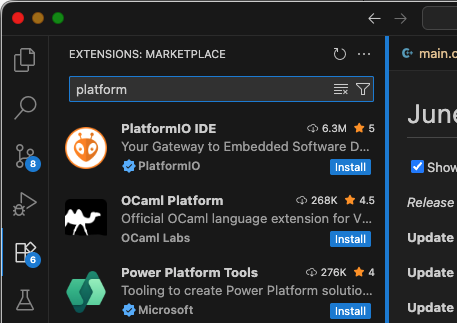
install 押すと、しばらくしたら左下の歯車アイコンに1がついてVScodeのrestartが要求される。restartすると、しばらく裏で動いているようだが(ちょっとわからないが、要するに焦るなと言うことだろう)虫のアイコンが追加されて虫のアイコンをクリックするとこうなる。左メニュのPlatformIOのOpenを押した画面
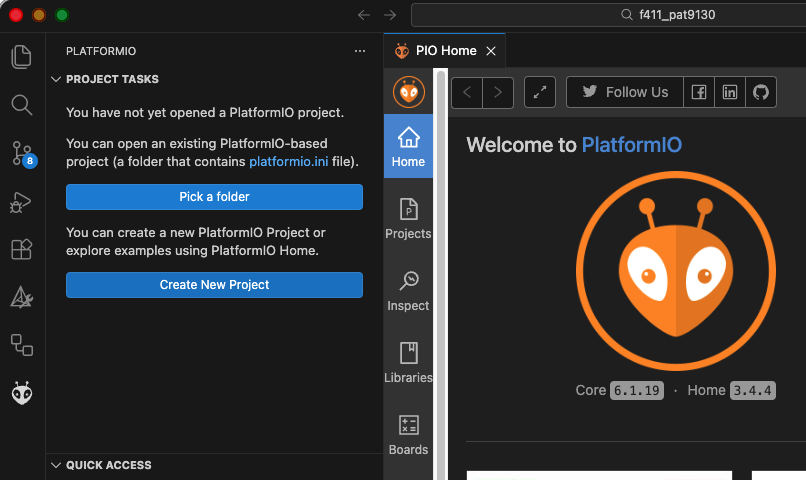
New Project
chatGPTによるとmbed-ceとは別のディレクトリにした方が良いとのこと。Locationをデフォルトではなく、別指定した。
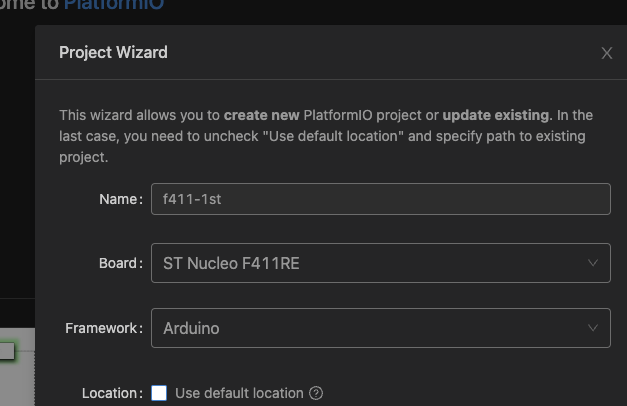
BoardにST Nucleo F411RE(使用するボード)を指定するとFrameworkにArduinoが出てくる。mbedとかも出てくるよ。今回はArduinoを選択してCreatすると、please waitが薄青になってクルクル回っているじょうたいになる。しばらくそのままほっとく。すると、右下に「restart window」とかってのが出てると思う。restartすると
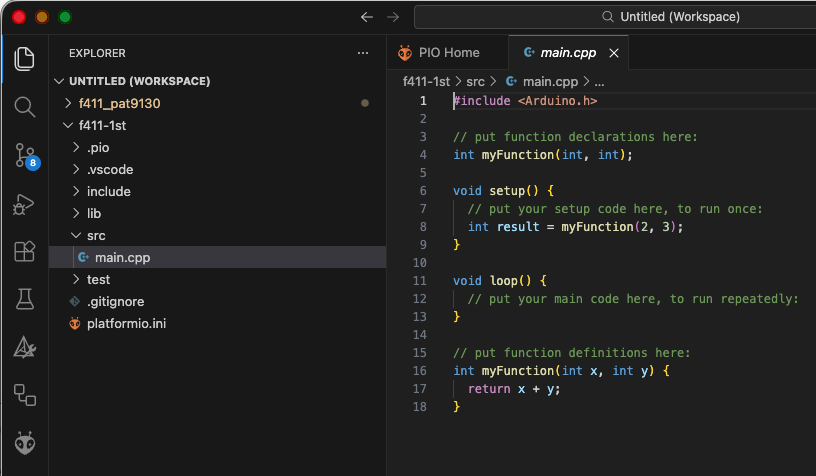
この状態になると思う。ここにArduinoと同じようにプログラムを書く。それで、
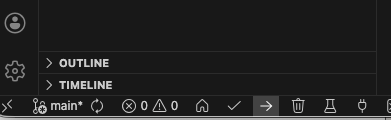
下の「→」右向いている矢印、これはuploadの意味らしいが、これをクリックすると、必要なものを勝手にダウンロードして勝手にビルドして書き込まれる。MacOSで行なっているがmbedやArduino-ideで行われるリセット時に一度切り離されないらしく、「勝手に外した「みたいなメッセージが出ずにリセットされプログラムが実行される。ふむ。これは便利かも。Outputウィンドーの表示内容を書き留めた
 *  Executing task in folder f411-1st: platformio run --target upload

Processing nucleo_f411re (platform: ststm32; board: nucleo_f411re; framework: arduino)
-------------------------------------------------------------------------
Tool Manager: Installing platformio/tool-stm32flash @ ~0.7.0
Downloading  [####################################]  100%
Unpacking  [####################################]  100%
Tool Manager: tool-stm32flash@0.7.0 has been installed!
Tool Manager: Installing platformio/tool-stm32duino @ ~1.0.1
Downloading  [####################################]  100%
Unpacking  [####################################]  100%
Tool Manager: tool-stm32duino@1.0.1 has been installed!
Tool Manager: Installing platformio/tool-openocd @ ~3.1200.0
Downloading  [####################################]  100%
Unpacking  [####################################]  100%
Tool Manager: tool-openocd@3.1200.0 has been installed!
Tool Manager: Installing platformio/tool-dfuutil @ ~1.11.0
Downloading  [####################################]  100%
Unpacking  [####################################]  100%
Tool Manager: tool-dfuutil@1.11.241029 has been installed!
Tool Manager: Installing platformio/tool-dfuutil-arduino @ ~1.11.0
Downloading  [####################################]  100%
Unpacking  [####################################]  100%
Tool Manager: tool-dfuutil-arduino@1.11.0 has been installed!
Verbose mode can be enabled via `-v, --verbose` option
CONFIGURATION: https://docs.platformio.org/page/boards/ststm32/nucleo_f411re.html
PLATFORM: ST STM32 (19.4.0) > ST Nucleo F411RE
HARDWARE: STM32F411RET6 100MHz, 128KB RAM, 512KB Flash
DEBUG: Current (stlink) On-board (stlink) External (blackmagic, cmsis-dap, jlink)
PACKAGES:
 - framework-arduinoststm32 @ 4.21100.0 (2.11.0)
 - framework-cmsis @ 2.50900.0 (5.9.0)
 - tool-dfuutil @ 1.11.241029
 - tool-dfuutil-arduino @ 1.11.0
 - tool-openocd @ 3.1200.0 (12.0)
 - tool-stm32duino @ 1.0.1
 - tool-stm32flash @ 0.7.0
 - toolchain-gccarmnoneeabi @ 1.120301.0 (12.3.1)
LDF: Library Dependency Finder -> https://bit.ly/configure-pio-ldf
LDF Modes: Finder ~ chain, Compatibility ~ soft
Found 14 compatible libraries
Scanning dependencies...
No dependencies
Building in release mode
Compiling .pio/build/nucleo_f411re/FrameworkArduinoVariant/PeripheralPins.c.o
・・・(途中略)
Compiling .pio/build/nucleo_f411re/FrameworkArduino/wiring_time.c.o
Archiving .pio/build/nucleo_f411re/libFrameworkArduino.a
Indexing .pio/build/nucleo_f411re/libFrameworkArduino.a
Linking .pio/build/nucleo_f411re/firmware.elf
Checking size .pio/build/nucleo_f411re/firmware.elf
Advanced Memory Usage is available via "PlatformIO Home > Project Inspect"
RAM:   [          ]   0.9% (used 1156 bytes from 131072 bytes)
Flash: [          ]   2.2% (used 11676 bytes from 524288 bytes)
Configuring upload protocol...
AVAILABLE: blackmagic, cmsis-dap, jlink, mbed, stlink
CURRENT: upload_protocol = stlink
Uploading .pio/build/nucleo_f411re/firmware.elf
xPack Open On-Chip Debugger 0.12.0-01004-g9ea7f3d64-dirty (2023-01-30-17:03)
Licensed under GNU GPL v2
For bug reports, read
        http://openocd.org/doc/doxygen/bugs.html
debug_level: 1

srst_only separate srst_nogate srst_open_drain connect_deassert_srst

[stm32f4x.cpu] halted due to debug-request, current mode: Thread
xPSR: 0x01000000 pc: 0x08001e5c msp: 0x20020000
** Programming Started **
** Programming Finished **
** Verify Started **
** Verified OK **
** Resetting Target **
shutdown command invoked
================================================== [SUCCESS] Took 23.28 seconds ==================================================
 *  Terminal will be reused by tasks, press any key to close it.
ふむ、これはいいな。編集するときは、ヒント出るし。

コメントを追加